.avif)
Why Your Smart Thermostat Says It's Cooling But the Vents Beg to Differ
Your smart thermostat is just a digital switch, not a guarantee that your AC compressor is actually running. Learn why this software-hardware disconnect happens and what to check first.
Your smart thermostat is just a digital switch, not a guarantee that your AC compressor is actually running. Learn why this software-hardware disconnect happens and what to check first.

The Brain vs. Brawn Disconnect in Your AC System
You are staring at the wall, wondering exactly why your smart thermostat says it's cooling but the vents beg to differ, especially when your Sacramento home feels more like a sauna than a sanctuary. The screen glows a reassuring blue. The animation shows air flowing. Yet, when you hold your hand up to the nearest register, you are met with a weak stream of room-temperature air—or worse, absolutely nothing at all. This sheer frustration is one of the most common experiences homeowners face during the peak of summer, and it stems from a fundamental misunderstanding of how modern HVAC controls actually work.
When you need professional help to bridge this gap, our comprehensive air conditioning services are designed to get your system back on track.
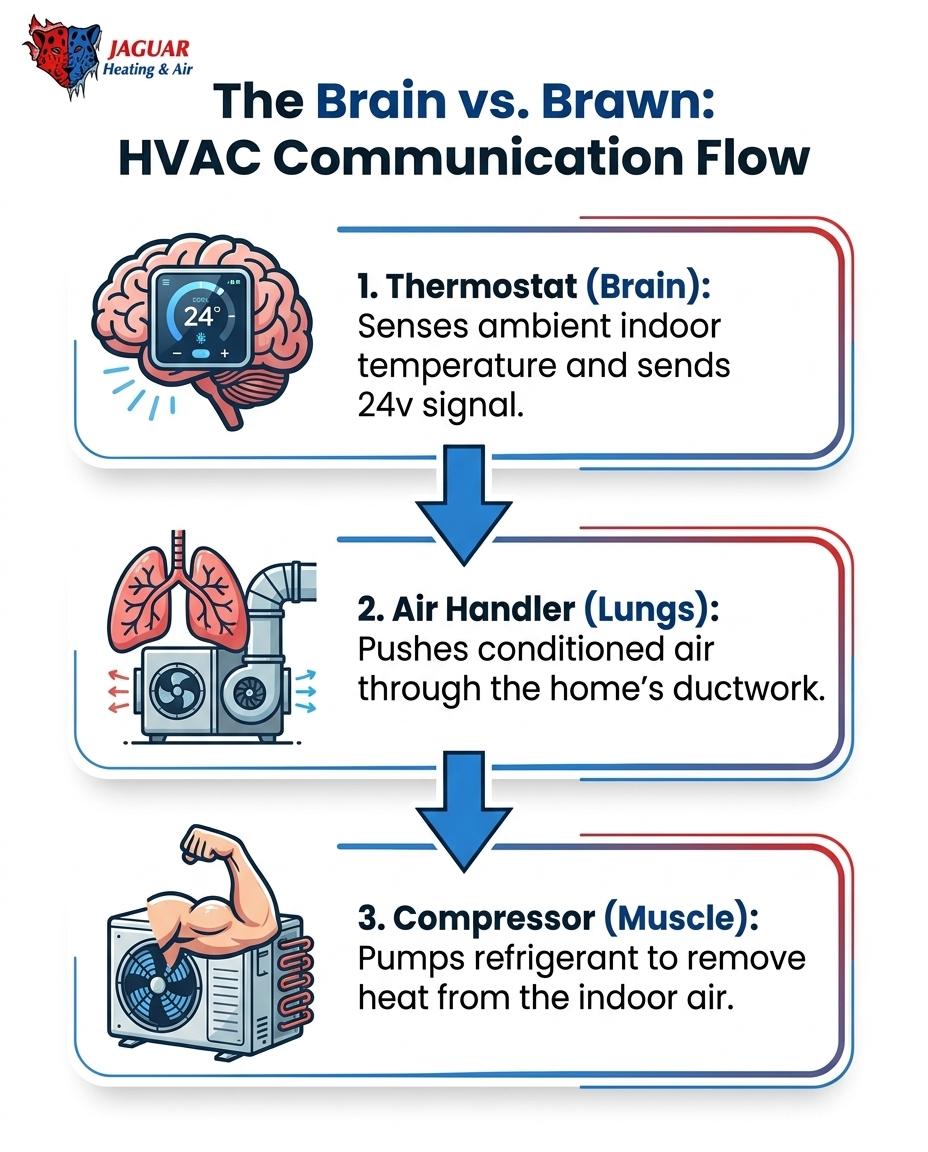
To solve this mystery, you have to understand the core concept of your cooling system: the thermostat is just the "brain" sending a signal, while the heavy equipment outside is the "muscle" doing the actual work. Your smart device on the wall is highly intelligent, but it is effectively blind to what is happening out in the yard. Right now, you are standing at an important decision point. You need to figure out what basic components you can safely diagnose yourself, and when it is time to call for professional backup. While you can easily check a filter or a breaker, diving into the mechanical components requires a licensed technician to keep both you and your equipment safe.
Understanding What the Blue 'Cooling' Screen Actually Means
Smart thermostats, like those made by Nest or Ecobee, are incredible pieces of technology. They learn your schedule, track your energy usage, and allow you to control your home's climate from a smartphone across the country. However, they operate by sending simple 24-volt low-voltage signals to your HVAC equipment. When the room temperature rises above your setpoint, the thermostat closes a relay and sends that 24v electrical current down a wire to the control board in your furnace or air handler.
Here is the critical disconnect: these devices only monitor the indoor ambient temperature. They do not monitor the health of your compressor, the status of your blower motor, or the physical refrigerant levels inside your copper lines. The blue screen on your wall simply means, "I have asked the air conditioner to turn on." It does not mean, "The air conditioner is successfully running and producing cold air."
We see this software-hardware disconnect frequently. One local homeowner reached out during a warm evening because their system wasn't running efficiently and the vents were blowing ambient air. Our technician arrived the next day, ran full diagnostics, and discovered the system was actually low on refrigerant. The owner-technician performed a pressure test, replaced the failing components, and recharged the system. The house cooled down perfectly—but throughout the entire failure, their smart thermostat had confidently displayed a blue cooling icon, completely unaware that the physical hardware was struggling. Software updates, Wi-Fi connectivity, and app reboots have absolutely no impact on the physical state of your HVAC hardware. When the mechanical side fails, you need AC repair in Sacramento to fix the heavy machinery.
The Late-Summer Hardware Hangover
By the time late-August heatwaves roll through the region, your air conditioning system has been running a marathon for months. This continuous, relentless operation creates cumulative heat stress on every moving part of your HVAC equipment. We call this the late-summer hardware hangover. The components that were fresh and responsive in May are now exhausted, making late summer a peak time for sudden mechanical failures.
Sacramento's triple-digit August heat creates extreme head pressure on outdoor compressors. The hotter the outdoor air becomes, the harder the compressor has to work to reject the heat it absorbed from inside your home. This immense physical strain makes the outdoor unit highly susceptible to overheating, tripping electrical breakers, or experiencing outright component failure.
The contrast between your indoor and outdoor equipment could not be sharper during this time of year. Consider the difference in their operating environments:
• Smart Thermostat — Operating Environment: 72°F, climate-controlled hallway — Role in the System: Digital signaling and temperature monitoring — Failure Mode: Software glitches, Wi-Fi drops, dead batteries
• Outdoor Compressor — Operating Environment: 105°F+ direct sunlight, dirt, and debris — Role in the System: Pressurizing refrigerant and rejecting heat — Failure Mode: Overheated motors, blown capacitors, tripped breakers
While your fresh, unbothered digital thermostat sits comfortably indoors asking for more cold air, the overworked mechanical hardware outdoors is fighting a brutal battle against the climate. When the hardware finally loses that battle and shuts down to protect itself, the thermostat simply keeps asking, oblivious to the mechanical crisis happening outside.
Airflow Obstructions: The Silent Culprit
Sometimes the outdoor unit is working perfectly, but you still feel warm air coming from the registers. In these cases, the communication between the thermostat and the equipment is fine, but the physical delivery of the air has been compromised. The most common, yet easily preventable, reason for this is severe airflow restriction.
The Problem: Starving the System of Air
Your air conditioner requires a specific volume of warm indoor air to pass over the cold indoor evaporator coil. This air exchange is what actually cools your house. If a severely clogged air filter restricts this vital airflow, the entire cooling process breaks down. The blower motor strains to pull air through a wall of dust, pet hair, and debris, drastically reducing the amount of air moving through your ductwork.
The Cause: A Freezing Chain Reaction
When airflow drops below a critical threshold, a destructive chain reaction begins. Because there is not enough warm air passing over the indoor evaporator coil to absorb the intense cold of the refrigerant, the temperature of the coil plummets. The natural humidity in your indoor air begins to condense on the freezing copper coils. Within hours, that condensation turns to frost, and eventually, the entire coil freezes solid into a block of ice.
The Solution: Restoring the Flow
Once the coil freezes completely, it acts as a physical wall blocking the ductwork. The blower motor will continue to run, but it can only force a tiny trickle of air around the ice. Because the air can no longer touch the cold fins of the coil, only warm, unconditioned ambient air will blow out of your vents. Your smart thermostat will operate flawlessly, demanding cooling, but until the ice melts and the restriction is removed, the house will only get warmer. Regular filter changes and routine AC maintenance are the absolute best ways to prevent this silent culprit from ruining your comfort.
Electrical and Mechanical Failures at the Compressor
If your airflow is strong but the air is warm, the problem usually lies outside. The thermostat is sending its 24-volt signal to the outdoor unit, but the "muscle" is refusing to respond. There are several electrical and mechanical roadblocks that can sever the connection between the indoor request and the outdoor action.
Tripped Circuit Breakers
The outdoor compressor draws a massive amount of electricity, especially upon startup. If the compressor is struggling against high late-summer heat, it may draw more amperage than the circuit is rated to handle. When this happens, the outdoor circuit breaker in your main electrical panel will trip to prevent a fire. This severs all high-voltage power to the muscle of the system. The indoor thermostat, running on its own separate low-voltage transformer, stays powered on and continues to display the cooling icon.
Blown Fuses in the Disconnect Box
Next to your outdoor unit sits a gray metal box mounted to the wall, known as the electrical disconnect. Inside this box, many systems utilize heavy-duty cartridge fuses. A sudden power surge or an aging compressor can cause these fuses to blow. Just like a tripped breaker, a blown fuse cuts power to the outdoor unit entirely, rendering the thermostat's commands useless.
Failed Contactors and Blown Capacitors
Even if power makes it past the breaker and the disconnect box, it still has to get through the internal components. The contactor is an electromagnetic switch that acts as the gatekeeper for electricity entering the compressor. When the 24v signal from the thermostat arrives, it energizes the contactor, pulling the switch closed to let the high voltage through. If the contactor is pitted, burned out, or infested with ants (a common summer issue), the switch won't close.
Similarly, the run capacitor acts as a massive battery that gives the compressor motor the jolt it needs to start spinning. Capacitors are highly sensitive to extreme heat and are the most common component to fail during the summer. If the capacitor is bulging or blown, the compressor will hum loudly but fail to start. In all of these scenarios, the smart thermostat remains completely unaware of the mechanical failure. If you are also dealing with a screen that refuses to light up at all, you might be facing a different electrical issue, which requires troubleshooting a blank smart thermostat screen.
Safe Troubleshooting Steps for Homeowners
Before you pick up the phone to call for help, there are a few safe, basic checks you can perform. By ruling out the simplest issues, you can sometimes restore your cooling instantly or provide valuable information to your technician.
1. Verify thermostat settings: Ensure the system is actually set to "cool" and not "heat" or "off." Check that the fan setting is on "auto" rather than "on." If the fan is set to "on," it will blow continuously, even when the compressor is resting, which feels like warm air coming from the vents.
2. Check and replace the indoor air filter: Locate your return air filter. Pull it out and hold it up to a light. If you cannot see light passing through it, it is dirty or clogged and must be replaced immediately. If you suspect your indoor coil is frozen, turn the thermostat to "off" and the fan to "on" to help thaw the ice.
3. Inspect the main electrical panel: Locate your home's primary breaker box. Look for the double-pole breaker labeled "AC" or "Condenser." If it is tripped (sitting in the middle position), firmly push it all the way to "off," then snap it back to "on." The quick fix rule: Only reset a tripped breaker once. If it trips again immediately, stop. The system is protecting itself from a serious short circuit.
4. Visually inspect the outdoor unit: Walk outside and look at the condenser. Is the large fan on top spinning? Is the unit making a loud buzzing or humming noise? Look for obvious damage or heavy debris blocking the side coils. Do not touch the internal components or stick anything through the fan grate.
When to Stop Checking and Call a Professional
There is a hard line between basic homeowner maintenance and dangerous DIY repairs. Heating and cooling systems utilize high-voltage electricity, highly pressurized refrigerant gases, and complex control wiring. Crossing that line puts your safety, your property, and your equipment at severe risk.
You must explicitly avoid opening any electrical panels on the HVAC unit, handling the copper refrigerant lines, or attempting to bypass safety switches. Tracing a 24v signal from the wall, through the furnace control board, out to the yard, and into the contactor requires specialized multimeters and extensive safety training.
This is where expert diagnostic capabilities make all the difference. Professionals systematically rule out issues to find the exact point of communication failure. They can quickly isolate whether the failure is in the 24v smart home wiring, a tripped breaker, a dead capacitor, or a seized compressor.
One homeowner reached out to us in the spring when their system simply wouldn't respond to the thermostat to heat the house. A technician arrived the very next day, called ahead to confirm the arrival time, and utilized professional diagnostic tools to pinpoint the breakdown immediately. They had the entire problem fixed in under 30 minutes. When you hit the limits of safe DIY checks, trusting an emergency HVAC service ensures the job is done safely and correctly the first time.
Frequently Asked Questions About Smart Thermostats and Warm Air
Why is my thermostat on cool but blowing warm air?
The thermostat is only a signal switch, not a diagnostic tool for your machinery. Warm air usually means the outdoor compressor isn't running due to a tripped breaker or failed part, or the indoor coil has frozen due to restricted airflow. The thermostat will continue to display "cooling" because it is successfully asking for cold air, even if the equipment cannot deliver it.
Can a bad thermostat cause AC not to cool?
Yes, if the internal relays inside the thermostat fail, it won't send the necessary 24v signal to the equipment. However, it's far more common for the mechanical hardware outside to fail than for the solid-state digital thermostat itself to break. A technician can easily test the wiring at the wall to determine if the thermostat is actually sending the voltage.
Why does my AC say it's on but no air is coming out?
This indicates a complete loss of indoor airflow, usually caused by a blower motor failure or a severely frozen evaporator coil blocking the ductwork entirely. The thermostat screen will still show that it is "cooling" because it is sending the signal, but without a functioning blower motor, no air can physically move through the vents.
How do I reset my thermostat when it's not cooling?
You can reboot the device via its internal settings menu or by gently pulling the main display off the wall plate for a few minutes before reattaching it. Keep in mind that a reboot only fixes software glitches or Wi-Fi hang-ups. A digital reset will never fix a mechanical AC failure like a blown capacitor or a refrigerant leak.
Is my smart thermostat incompatible with my older AC unit?
Most smart models work perfectly fine with older 24v systems, provided there is a dedicated "C-wire" (common wire) to supply continuous power to the digital display. Incompatibility usually shows up immediately during or right after installation. If your system has been working fine for months and suddenly starts blowing warm air, it is a mechanical breakdown, not a compatibility issue.
Restore Your Home's Comfort Safely and Quickly
Understanding the software-hardware disconnect provides immediate relief from the frustration of staring at a thermostat that claims it is cooling while you sweat in your living room. Knowing that your smart device is just the brain—and that the heavy lifting is done by the brawn outside—helps you approach the problem logically. By sticking to safe, basic checks like inspecting your air filter and verifying your electrical panel, you protect your Sacramento home from further damage. When those basic steps don't solve the issue, knowing your DIY limits is crucial. Reach out to local experts to bridge the gap between your thermostat's brain and your AC's brawn, ensuring your system is diagnosed safely, repaired correctly, and restored to peak performance.
Recent Posts
The Fall Seasonal Home Maintenance Checklist: Decoding Heating Startup Smells and Sounds
What that burning dust smell means for your furnace, and how to use this seasonal home maintenance checklist to decide when to call a pro this fall.
Why Does My Heater Smell Like Burning Dust? Common Homeowner Questions Answered & A Fall Guide to AC Repair in Sacramento, CA
Why does your heater smell like burning dust? With common homeowner questions answered, see what we found causes this fall odor and when to call a pro.
Decoding Fall HVAC Startups: Your Guide to Maintenance and AC Repair in Sacramento, CA
Navigating the October Shift: When Sacramento Weather Demands Both Cooling and Heating October in the Central Valley brings a sudden, sharp transition in weathe